Building a CBIR System with ViT Transformer - A Modern Approach to Image Search

Learn how to build an effective CBIR search engine using a ViT transformer.
11st Avr 2024
Building a CBIR System with ViT Transformer - A Modern Approach to Image Search
In today's visually driven digital landscape, the need for robust image search capabilities has never been more pressing. From e-commerce platforms to social media networks, the ability to efficiently retrieve relevant images is crucial for enhancing user experiences and driving engagement.
Our latest project delves into the realm of Content-Based Image Retrieval (CBIR), where we set out to develop a cutting-edge image search engine. Our approach? Harnessing the power of the Vision Transformer (ViT) architecture to revolutionize how images are indexed and searched.
In this article, we invite you to join us on a journey through the development of our CBIR search engine. We'll showcase how the ViT transformer, coupled with Principal Component Analysis (PCA) for dimensionality reduction and the Annoy algorithm for search indexing, has enabled us to create a system that not only delivers accurate search results but also does so with lightning-fast speed.
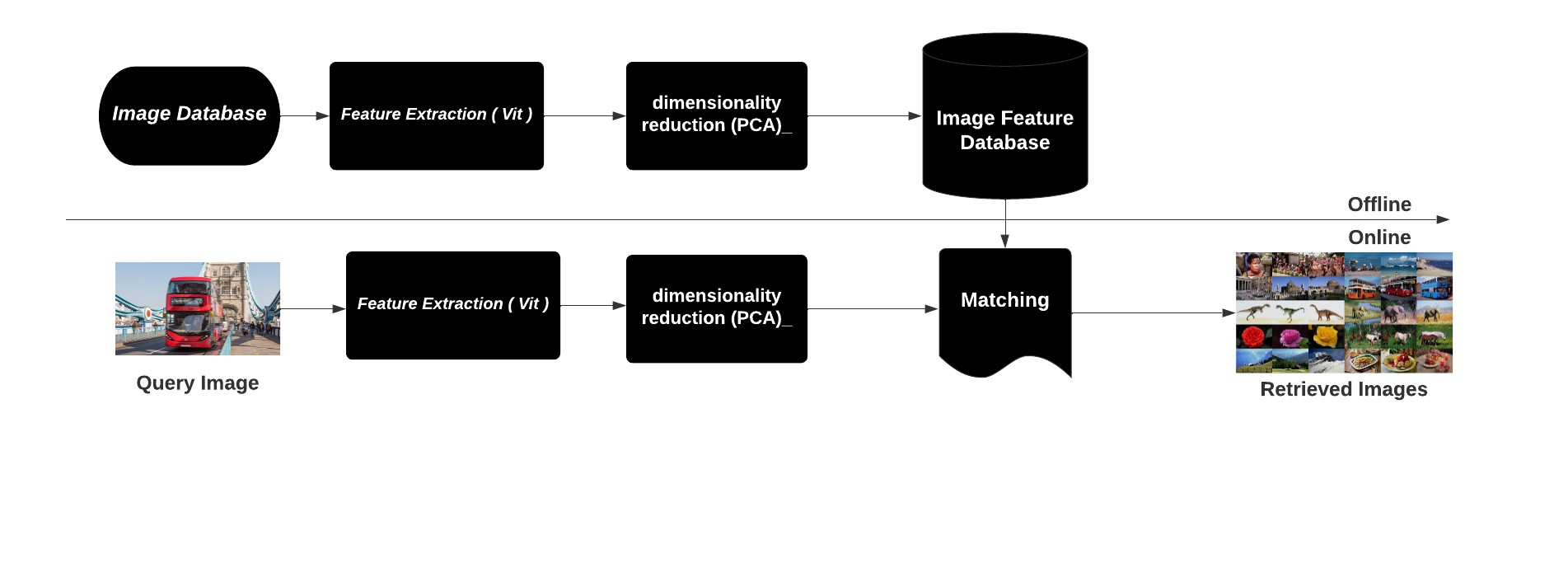
Prerequisites && Setup
let's first start by the needed libraries which are the following ones
pip install tensorflow tensorflow-addons opencv-python scikit-learn joblib numpy pillow vit_keras hydra-core annoy
- TensorFlow
- TensorFlow Addons
- OpenCV (opencv-python)
- scikit-learn
- joblib
- NumPy
- Pillow
- ViT for Keras (vit_keras)
- Hydra Core
- Annoy
and then make yaml file to control variables related to the environment, we can use Hydra. Hydra allows us to easily manage configuration options for our application. Here is an example of a configuration file (config.yaml) that specifies the dataset path, features path, and other settings:
environement:
  dataset_path: C:\Users\Hp\Desktop\CBIR-New-Search-Engine-Approach\dataset\training_set
  feutures_path: C:\Users\Hp\Desktop\CBIR-New-Search-Engine-Approach\database
  Ovveride_modele : False

modele:
  image_size : 224
  feutures_shape : 1024

PCA:
  n_components : 128

Annoy:
  n_tree : 15
Dataset Configuration
- dataset_path: The path to the dataset directory containing the images for indexing and searching. In this example, it is set to C:\Users\Hp\Desktop\CBIR-New-Search-Engine-Approach\dataset\training_set.
- feutures_path: The path to the directory where the extracted features and PCA model will be stored. In this example, it is set to C:\Users\Hp\Desktop\CBIR-New-Search-Engine-Approach\database.
- Override_modele: A boolean flag indicating whether to override existing models. If set to True, existing models will be overridden; if set to False, existing models will not be overridden.
Model Configuration
- modele.image_size: The size of the images to be used for processing. In this example, it is set to 224.
- modele.feutures_shape: The shape of the extracted features. In this example, it is set to 1024.
PCA Configuration
- PCA.n_components: The number of components to keep after PCA dimensionality reduction. In this example, it is set to 128. Annoy Configuration
- Annoy.n_tree: The number of trees to build in the Annoy index. More trees lead to more accuracy in nearest neighbor searches but require more memory. In this example, it is set to 15.
Step 1: Feature Extraction from Images
The first step in our CBIR system is to extract features from images using a pre-trained Vision Transformer (ViT) model. Feature extraction involves converting images into numerical representations that capture important visual characteristics. These features will be used to compare and retrieve similar images later in the search process.
How it works:
- let's import the neccesery libraries
# for loading/processing the images
from tensorflow.keras.preprocessing.image import load_img
from tensorflow.keras.preprocessing.image import img_to_array
from vit_keras import vit
import tensorflow_addons as tfa
import numpy as np
import os
from tqdm import tqdm
from tensorflow.keras.models import Sequential
import tensorflow as tf
from omegaconf import DictConfig, OmegaConf
- Loading the Pre-trained ViT Model: We start by loading a pre-trained ViT model. This model has been trained on a large dataset to extract meaningful features from images.
def loadPretrainedVit(IMAGE_SIZE : int)->Sequential:

    '''

     Parameters
     ----------
     IMAGE_SIZE : int

     Returns
     -------
     Sequential

     '''

    print("[INFO] Start loading pre-trained model")

    vit_model = vit.vit_l32(
        image_size = (int(IMAGE_SIZE), int(IMAGE_SIZE)),
        activation = 'softmax',
        pretrained = True,
        include_top = False,
        pretrained_top = False)

    return vit_model
- Processing Images: Images are loaded from file paths and preprocessed to match the input requirements of the ViT model. This includes resizing and normalizing the images.
def getFeautureVector(file : str, IMAGE_SIZE : int ,model: Sequential )->Sequential:
    '''


    Parameters
    ----------
    file : str.
    IMAGE_SIZE : int.
    model : Sequential.

    Returns
    -------
    Sequential.

    '''


    #load image from giving path
    img = load_img(file, target_size=(int(IMAGE_SIZE), int(IMAGE_SIZE)))
    # convert from 'PIL.Image.Image' to numpy array
    img = img_to_array(img)
    #reshape the giving image
    img_array = tf.expand_dims(img, 0)
    img_array = img_array /255

    #predict fauture vector
    return model.predict(img_array, verbose=0)
- Extracting Features: The ViT model is used to extract features from each image. These features represent the visual characteristics of the image in a high-dimensional numerical format.
- Saving Features: The extracted features, along with the corresponding file names, are saved to disk for later use in the search process.
def exctacteFeatures(images : list, dirtosave : str, cfg : DictConfig)->None:
    '''


    Parameters
    ----------
    images : list.
    dirtosave : str.
    cfg : DictConfig.

    Raises
    ------
    Exception.

    Returns
    -------
    None.

    '''


    IMAGE_SIZE = cfg["modele"]["image_size"]
    model = loadPretrainedVit(IMAGE_SIZE)
    extracted_feautures = {}
    try:
        for image in tqdm(images):
            prediction = getFeautureVector(image,IMAGE_SIZE, model)
            extracted_feautures[image] = prediction

        print('[INFO] Save feautures and filenames')
        filenames = np.array(list(extracted_feautures.keys()))
        features = np.array(list(extracted_feautures.values()))

        np.save(os.path.join(dirtosave, "filesnames.npy"), filenames)
        np.save(os.path.join(dirtosave, "feautures.npy"), features)
    except Exception as exception:
        raise Exception("An error occured!", exception)
Summary: The first step of our CBIR system involves extracting features from images using a pre-trained ViT model.
"""

@author: Zitane Smail
"""

# for loading/processing the images
from tensorflow.keras.preprocessing.image import load_img
from tensorflow.keras.preprocessing.image import img_to_array
from vit_keras import vit
import tensorflow_addons as tfa
import numpy as np
import os
from tqdm import tqdm
from tensorflow.keras.models import Sequential
import tensorflow as tf
from omegaconf import DictConfig, OmegaConf


def loadPretrainedVit(IMAGE_SIZE : int)->Sequential:

    '''

     Parameters
     ----------
     IMAGE_SIZE : int

     Returns
     -------
     Sequential

     '''

    print("[INFO] Start loading pre-trained model")

    vit_model = vit.vit_l32(
        image_size = (int(IMAGE_SIZE), int(IMAGE_SIZE)),
        activation = 'softmax',
        pretrained = True,
        include_top = False,
        pretrained_top = False)

    return vit_model


# Extract feautures from giving image
def getFeautureVector(file : str, IMAGE_SIZE : int ,model: Sequential )->Sequential:
    '''


    Parameters
    ----------
    file : str.
    IMAGE_SIZE : int.
    model : Sequential.

    Returns
    -------
    Sequential.

    '''


    #load image from giving path
    img = load_img(file, target_size=(int(IMAGE_SIZE), int(IMAGE_SIZE)))
    # convert from 'PIL.Image.Image' to numpy array
    img = img_to_array(img)
    #reshape the giving image
    img_array = tf.expand_dims(img, 0)
    img_array = img_array /255

    #predict fauture vector
    return model.predict(img_array, verbose=0)


def exctacteFeatures(images : list, dirtosave : str, cfg : DictConfig)->None:
    '''


    Parameters
    ----------
    images : list.
    dirtosave : str.
    cfg : DictConfig.

    Raises
    ------
    Exception.

    Returns
    -------
    None.

    '''


    IMAGE_SIZE = cfg["modele"]["image_size"]
    model = loadPretrainedVit(IMAGE_SIZE)
    extracted_feautures = {}
    try:
        for image in tqdm(images):
            prediction = getFeautureVector(image,IMAGE_SIZE, model)
            extracted_feautures[image] = prediction

        print('[INFO] Save feautures and filenames')
        filenames = np.array(list(extracted_feautures.keys()))
        features = np.array(list(extracted_feautures.values()))

        np.save(os.path.join(dirtosave, "filesnames.npy"), filenames)
        np.save(os.path.join(dirtosave, "feautures.npy"), features)
    except Exception as exception:
        raise Exception("An error occured!", exception)
Step 2: Building an Annoy Index and Applying PCA
In this step, we will build an Annoy index for fast approximate nearest neighbor search and apply Principal Component Analysis (PCA) to reduce the dimensionality of the extracted features. The Annoy index will allow us to efficiently search for similar images in the feature space, while PCA will help in reducing the memory usage and speeding up the search process.
lest's ensure the import first
from sklearn.decomposition import PCA
import numpy as np
import joblib
import os

from annoy import AnnoyIndex
from PIL import Image

from feautures import getFeautureVector, loadPretrainedVit
from omegaconf import DictConfig, OmegaConf
# Applaying Annoy - and pca to reduce the verctor dementions
def buildAnnoyIndex(db_path: str) -> None:
    '''
   Parameters
   ----------
   db_path : str
       database path.
   cfg : DictConfig
       DictConfig.

   Returns
   -------
   None

    '''

    feutures_shape = 1024
    n_components = 128
    n_three = 15

    print("[INFO] Loading Features")
    feature_list = np.load(os.path.join(
        db_path, 'feautures.npy')).reshape(-1, feutures_shape)

    print("[INFO] Running PCA")
    # 128 default value
    n_components = n_components
    pca = PCA(n_components=n_components)
    components = pca.fit_transform(feature_list)
    joblib.dump(pca, os.path.join(db_path, "pca.joblib"))

    print("[INFO] Building Index")
    feature_length = n_components
    index = AnnoyIndex(feature_length, 'angular')
    for i, j in enumerate(components):
        index.add_item(i, j)

    index.build(n_three)
    index.save(os.path.join(db_path, "index.annoy"))
Step 3: Searching for Similar Images
Now that we have built the Annoy index and applied PCA to the extracted features, we can proceed with searching for similar images. This step involves processing an input image, extracting its features, and using the Annoy index to find the nearest neighbors in the feature space. The goal is to retrieve a set of similar images based on the content similarity to the input image.
# get Similar images path
def getSimilarImagesPath(input_path, IMAGE_SIZE,  output_path=r"\python_pro_per\results", features_path=r"\python_pro_per\database", index_path=r"\python_pro_per\database", n=20):
    '''


    Parameters
    ----------
    input_path : TYPE

    IMAGE_SIZE : TYPE

    output_path : TYPE, optional
         The default is results".
    features_path : TYPE, optional
         The default is database".
    index_path : TYPE, optional
         The default is database".
    n : TYPE, optional
         The default is 20.

    Returns
    -------
    resultPath : TYPE

    '''

    print("[INFO] Instantiating Model")
    resultPath = []
    print("[INFO] Loading Image Filename Mapping")
    filename_list = np.load(os.path.join(features_path, "filesnames.npy"))

    print("[INFO] Extracting Feature Vector")
    model = load_pretrained_vit(IMAGE_SIZE)
    image = get_feauture_vector(input_path, IMAGE_SIZE, model)

    input_features = image

    print("[INFO] Applying PCA")

    pca = joblib.load(os.path.join(features_path, "pca.joblib"))
    components = pca.transform(input_features)[0]

    print("[INFO] Loading ANN Index")
    ann_index = AnnoyIndex(components.shape[0], 'angular')
    ann_index.load(os.path.join(index_path, "index.annoy"))

    print("[INFO] Finding Similar Images")
    indices = ann_index.get_nns_by_vector(
        components, n, search_k=-1, include_distances=False)
    indices = np.array(indices)
    similar_image_paths = filename_list[indices]

    print("[INFO] Saving Similar Images to {0}".format(output_path))
    for index, image in enumerate(similar_image_paths):
        img_path = os.path.join(os.getcwd(), image)
        img = Image.open(img_path)
        img.save(os.path.join(output_path, 'res_'+str(index)+'.jpg'))
        resultPath.append(image.split('/')[-1])

    return resultPath
Step 4: Evaluating Images and Retrieving Similar Images
In this step, we focus on building the functionality to evaluate an input image and find visually similar images from the database. This process involves several key steps:
Setting Image Size: We set the size of the input images to ensure consistency in processing and comparison with the database images.
Checking Image Existence: Before proceeding, we check if the specified input image exists. This validation step ensures that the evaluation process can continue without errors.
Retrieving Similar Images: We use the getSimilarImagesPath function, which leverages the previously built Annoy index and PCA-transformed features, to retrieve a list of similar images to the input image from the database.
Displaying Results: Finally, we print the paths of the retrieved similar images. This step provides the user with a visual representation of the similar images found in the database.
By implementing this logic, we enable users to quickly and efficiently find visually similar images based on their input, enhancing the usability and functionality of our image search system.
"""

@author: Zitane Smail
"""

from feautures import *
from index_search import *
import hydra
from omegaconf import DictConfig, OmegaConf
import os


@hydra.main(version_base=None, config_path="conf", config_name="config")
def evaluate(cfg : DictConfig)->list:
    '''


    Parameters
    ----------
    cfg : DictConfig.

    Raises
    ------
    Exception.

    Returns
    -------
    list.

    '''
    global IMAGE_SIZE
    IMAGE_SIZE = cfg["modele"]["image_size"]
    image_path = cfg["modele"]["file"]
    if os.path.exists(image_path) == False:
        raise Exception("Image Not Found")
    #return image_path
    results = getSimilarImagesPath(image_path, IMAGE_SIZE)
    print(results)


evaluate()
Step 5 : Index images and store features
In this step, we will implement the main logic to index our dataset of images and apply PCA to store the features. This process involves the following key steps:
- Loading Configuration: We load the configuration parameters using Hydra, which allows us to specify the dataset path, features path, and other settings.
- Globbing Dataset: We use the glob module to recursively search for all JPEG images in the dataset directory. This creates a list of file paths to our dataset images.
- Extracting Features: We call the exctacteFeatures function, passing the dataset and features path, to extract features from each image in the dataset using the ViT model.
- Building Annoy Index: After extracting the features, we call the buildAnnoyIndex function to build an Annoy index for fast nearest neighbor search.
- Applying PCA: PCA is applied to the extracted features to reduce their dimensionality, which helps in improving the efficiency of the search process.
- Storing Features: The extracted features and the PCA model are saved to the specified features path for future use in searching for similar images.
from feautures import *
from index_search import buildAnnoyIndex
import glob
import hydra
from omegaconf import DictConfig, OmegaConf
import sys

@hydra.main(version_base=None, config_path="../conf", config_name="config")
def main(cfg : DictConfig) -> None:
    '''
    Parameters
    ----------
    cfg : DictConfig

    Returns
    -------
    None

    '''
    dataset_path = cfg["environement"]["dataset_path"]
    feutures_path = cfg["environement"]["feutures_path"]
    dataset = glob.glob(f"{dataset_path}/**/*.jpg", recursive=True)
    exctacteFeatures(dataset, feutures_path, cfg)
    buildAnnoyIndex(feutures_path, cfg)

if __name__ == "__main__":
    main()
Conclusion and Next Steps
Congratulations! You have successfully implemented a new content-based image retrieval (CBIR) search engine using a transformer-based approach. By following the steps outlined in this guide, you have indexed a dataset of images, applied PCA for dimensionality reduction, built an Annoy index for efficient nearest neighbor search, and implemented a feature to evaluate an input image and retrieve similar images from the dataset.
To utilize your CBIR search engine, users can follow these steps:
- Use the Hydra configuration to specify the dataset path, features path, and other settings.
- Run the main script to index the dataset, apply PCA, and build the Annoy index.
- Use the Hydra configuration to specify the input image path and run the main script again to evaluate the input image and retrieve similar images.
By following these steps, users can leverage your CBIR search engine to find visually similar images based on their input. If users have any questions or need further assistance, they can connect with you on GitHub, where they can find all the code for this project.
Thank you for using this CBIR search engine and happy image searching!
GitHub Repository: CBIR-New-Search-Engine-Approach
Connect with me on GitHub for any questions or support regarding the CBIR search engine.
Happy coding!